This guide reflects the state of Vertex AI RAG Engine as of early 2026. Google Cloud services evolve rapidly, and some features or pricing may have changed since publication. Always verify against the official documentation for the most current information.
The Uncomfortable Truth About RAG
Large language models have a fundamental problem. They don’t know your data. They hallucinate. They make things up with alarming confidence. This isn’t a bug. It’s an inherent limitation of transformer architectures that can only generate responses based on training data.
Retrieval-Augmented Generation is the fix. It grounds LLMs in your actual enterprise data, producing accurate, verifiable responses.
But here is what most teams don’t understand until it’s too late: building RAG from scratch means stitching together document parsers, chunking logic, embedding models, vector databases, and retrieval pipelines. It’s a massive engineering challenge. Most RAG implementations fail because engineers underestimate the data pipeline complexity.
Google’s Vertex AI RAG Engine industrializes what was previously a fragile, hand-stitched architecture into a managed service with production-grade guarantees. This guide covers the architectural decisions, the hidden constraints, the cost formulas, and the complete working code you need.
TL;DR — The Decision Matrices That Actually Matter
Vector Database Comparison
| Database | Management | CMEK | Best For |
|---|---|---|---|
| RagManagedDb | Fully managed | Yes | Most teams should start here |
| RagManagedVertexVectorSearch | Fully managed | No | Latest features, data visibility |
| Weaviate | User-managed | No | Hybrid search, open-source flexibility |
| Pinecone | User-managed | No | Existing Pinecone investments |
| Vertex AI Feature Store | User-managed | No | BigQuery-native workflows |
Parser Comparison
| Parser | Cost | Best For |
|---|---|---|
| Default | Free | Plain text, simple PDFs |
| LLM Parser | Per-token | Complex documents with tables and charts |
| Document AI Layout | Document AI pricing | Context-aware chunking for structured docs |
Embedding Models
| Model | Use Case |
|---|---|
text-embedding-005 | Default, English-only, recommended for RAG corpora |
text-multilingual-embedding-002 | Multilingual corpora |
| Fine-tuned or OSS models | Long-term projects that need deprecation protection |
Cost Snapshot (Monthly PoC)
| Component | Estimated Cost |
|---|---|
| RagManagedDb Basic | Around $200-250/month |
| Embeddings (1M tokens) | $0.075 |
| LLM Parser (5M tokens) | $3.75 |
| Vertex Ranking API (10k requests) | $1 |
| Gemini 2.0 Flash (3M output tokens) | $7.5 |
The Limits You’ll Hit
- 3 concurrent imports per region
- 60 RPM for management APIs
- 600 RPM for retrieval queries
- 10,000 maximum files per import request
- One corpus per generation request
- 50 unique KMS keys per project per region for CMEK
The Architecture: Six Stages You Must Understand
 The six-stage RAG pipeline implemented by Vertex AI RAG Engine.
Vertex AI RAG Engine implements a specific architecture. You need to understand each stage at a granular level:
Data Ingestion -> Transformation -> Embedding -> Indexing -> Retrieval -> GenerationEach stage has tradeoffs, failure modes, and costs. Let’s examine them.
Stage 1: Data Ingestion
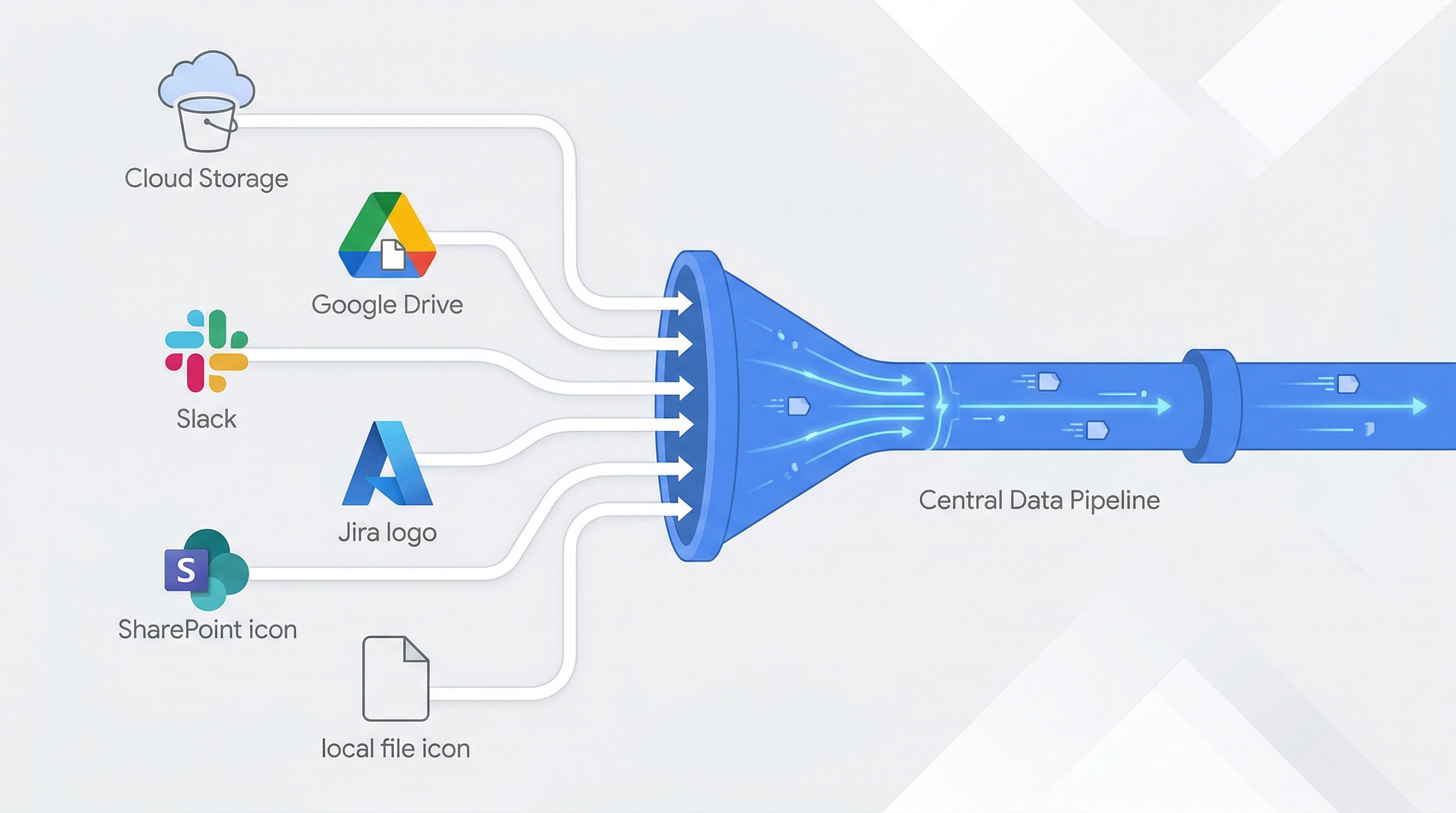 Multiple data sources feeding into the RAG ingestion pipeline.
Supported Sources
| Source | Size Limits | Key Requirements |
|---|---|---|
| Local file upload | Up to 25 MiB per file | Synchronous, good for demos |
| Cloud Storage | Unlimited objects (each up to 5 TiB) | Bulk import via ImportRagFiles |
| Google Drive | Standard Drive quotas | Service account needs Viewer permission |
| Slack | API-dependent | API key stored in Secret Manager |
| Jira | API-dependent | API key stored in Secret Manager |
| SharePoint | API-dependent | Azure app registration required |
The Silent Failure Problem
Google Drive imports fail silently. The Vertex AI RAG Data Service Agent (service-{project_number}@gcp-sa-vertex-rag.iam.gserviceaccount.com) must have Viewer permissions on specific folders. Without this, no files import and no error message displays. This catches many teams off guard.
Data Deduplication
Files are hashed by content, path, and filename. The response.skipped_rag_files_count tells you how many were skipped because they were unchanged. A file is skipped when it has been imported before, hasn’t changed, and the chunking configuration hasn’t changed.
Service Account Prerequisites
When ingesting from Drive, Slack, or external connectors:
- Enable Secret Manager
- Store API keys as secrets
- Grant the RAG service account
roles/secretmanager.secretAccessor - Reference secrets as
projects/<PROJECT>/secrets/<SECRET>/versions/latest
Stage 2: Data Transformation
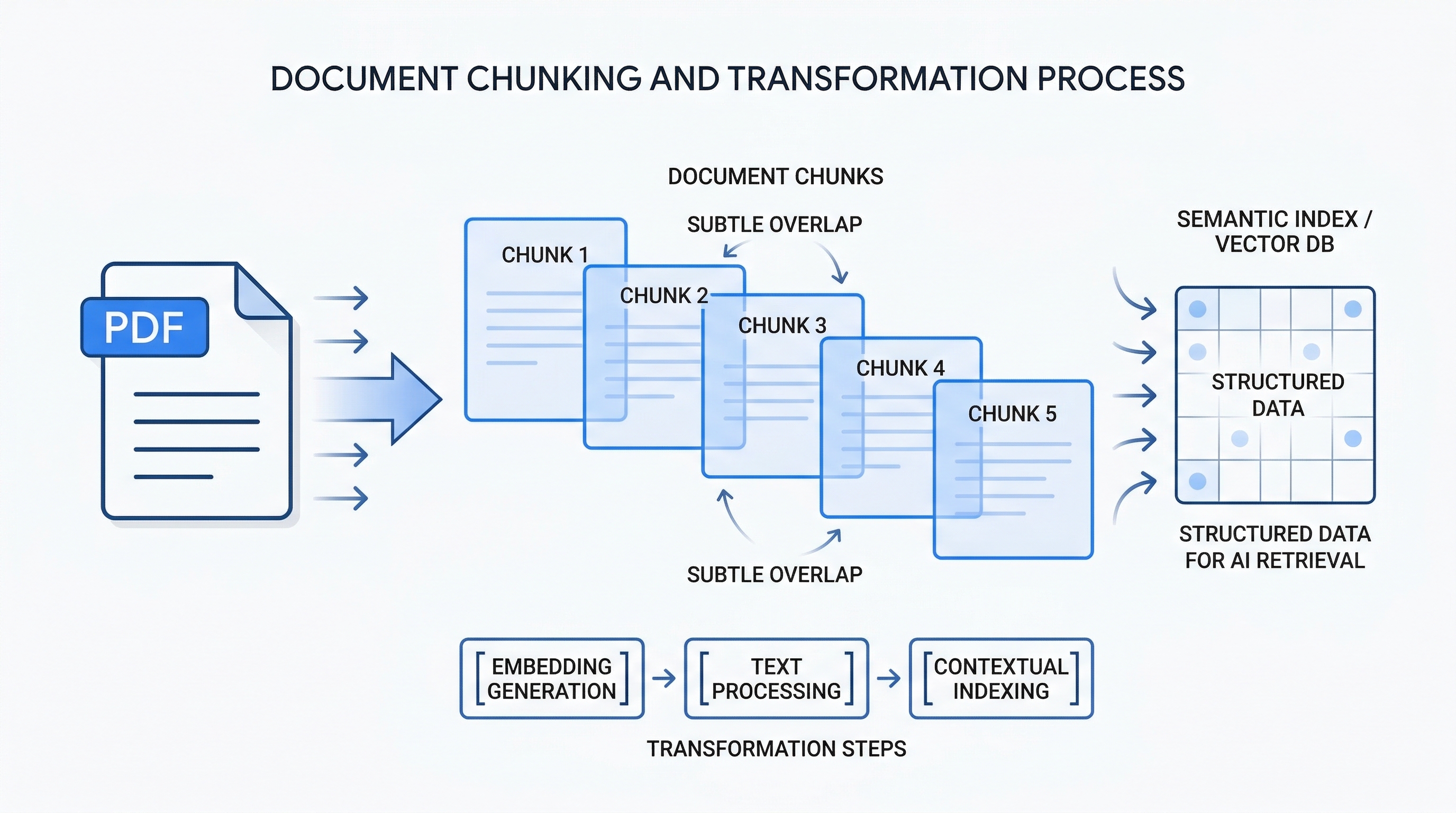 Document parsing and chunking with overlap visualization.
Parsing Options
| Parser | Cost | Best For | Limitations |
|---|---|---|---|
| Default Parser | Free | Plain text, simple PDFs | Limited structure understanding |
| LLM Parser | Per-token (Gemini pricing) | Complex documents, charts, tables | Gemini 2.x variants only; 3.x not yet supported |
| Document AI Layout Parser | Document AI pricing | Context-aware chunking | Max 20 MB, 500 pages per PDF |
LLM Parser Cost Formula
Cost = N_files x N_pages x (input_tokens x input_price + output_tokens x output_price)Example: 1,000 PDFs with 50 pages each, 600 input tokens plus 100 output tokens per page, using Gemini 2.0 Flash-Lite ($0.075/M input, $0.3/M output):
Cost = 1,000 x 50 x (600 x 0.075/1M + 100 x 0.3/1M) = $3.75LLM Parser Custom Prompts
For specialized documents (legal contracts, technical manuals, scientific papers), custom prompts help extract the right information:
llm_parser_cfg = rag.LlmParserConfig(
    model_name="projects/<PROJECT>/locations/<LOC>/publishers/google/models/gemini-2.5-pro",
    custom_parsing_prompt="""You are a factual data extractor.
Extract key data from the document.
Present each fact in a structured list.
Focus on: names, dates, numbers.
Avoid: analysis or interpretation.""",
    max_parsing_requests_per_min=900
)
Chunking Strategy
Defaults are 1,024 tokens with 256 token overlap. Smaller chunks mean more precise embeddings but more retrieval calls. Larger chunks provide more context but risk losing specific details.
Important: Document AI Layout Parser ignores overlap settings and creates layout-aware chunks that respect headings, tables, and images.
transformation_config = rag.TransformationConfig(
    chunking_config=rag.ChunkingConfig(
        chunk_size=512,
        chunk_overlap=100
    )
)
Stage 3: Embedding Models
 Text being converted to numerical vectors in semantic space.
Model Options
| Model | Dimension | Use Case | Notes |
|---|---|---|---|
text-embedding-005 | 768 | Default, recommended for RAG | No deployment required |
text-multilingual-embedding-002 | 768 | Multilingual corpora | Same quality, multiple languages |
| Fine-tuned Gecko | 768 | Specialized domains | Immune to deprecation, requires endpoint |
| OSS E5 models | 384-1024 | Full control | Deploy from Model Garden first |
The Stickiness Problem
The embedding model is locked to the corpus at creation time. You cannot change it without recreating the corpus and re-importing all data. When publisher models are deprecated, you must migrate.
For long-term projects: Use fine-tuned or self-deployed OSS models. They survive deprecation.
Embedding Quotas
For gemini-embedding-001:
- Maximum input texts per request: 250
- Maximum tokens per request: 20,000
- Maximum tokens per input text: 2,048 (only first 2,048 tokens are used)
- Quota: 5,000,000 tokens per minute per region
Stage 4: Vector Database Choices
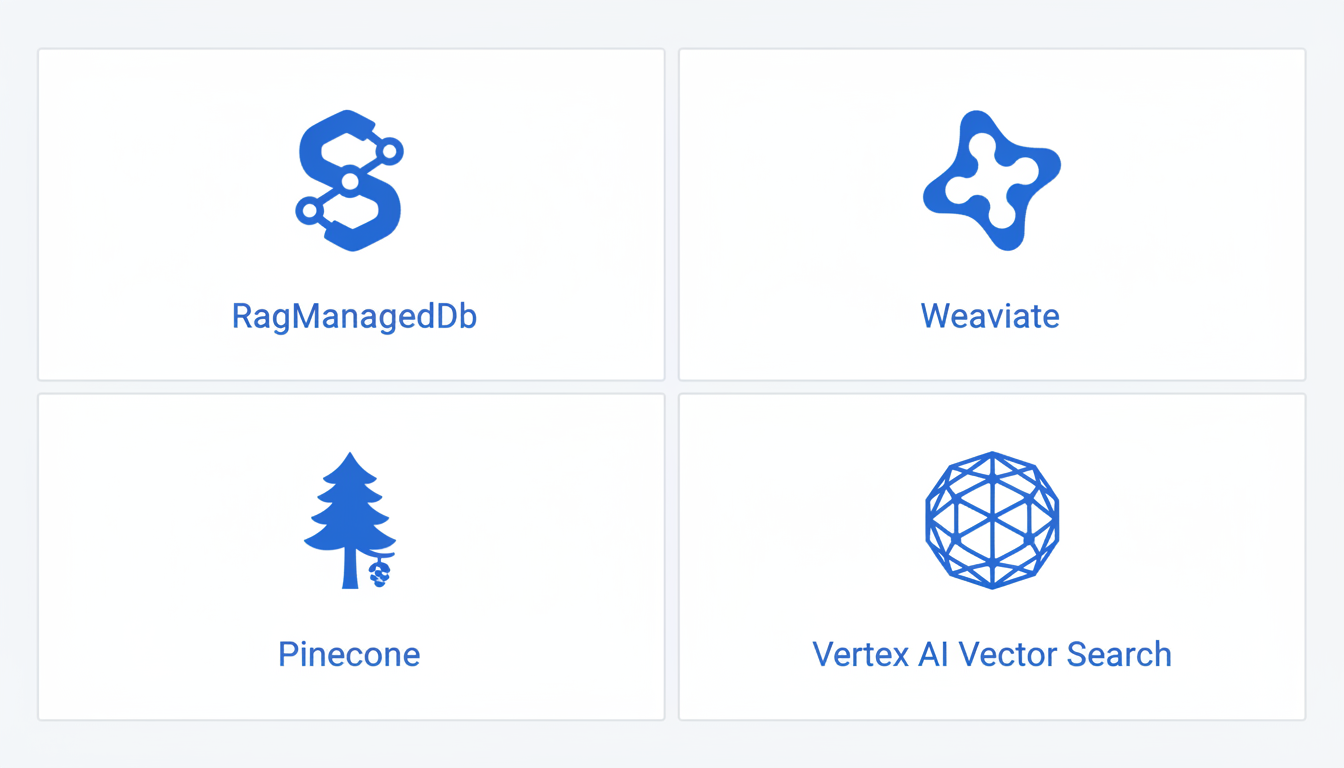 Comparison of vector database options for RAG Engine.
This is the most consequential decision you’ll make.
RagManagedDb (Default, Generally Available)
What most teams should use.
Underlying technology is Google Spanner. The RAG Engine manages provisioning and scaling.
Tiers:
- Basic: 100 processing units, fixed configuration (around $200-250/month)
- Scaled: 1,000-10,000 processing units (1-10 nodes), autoscaling, production-grade
- Unprovisioned: Deletes the Spanner instance, stops billing (cannot be reversed)
Retrieval strategies:
- KNN (Default): Exact nearest neighbors, perfect recall, latency increases with corpus size. Good for corpora under 10,000 files.
- ANN (Preview): Approximate nearest neighbors, lower latency for large corpora. Requires index rebuilding.
ANN Configuration:
tree_depth: 2 for around 10K files, 3 for larger corporaleaf_count: Recommended10 x sqrt(number_of_files), default is 500- You must rebuild after significant data changes:
rebuild_ann_index: true
RagManagedVertexVectorSearch (Preview)
Uses Vertex AI Vector Search 2.0. RAG Engine manages the Vector Search 2.0 collections, and you have full access to them in your project.
Availability: Only in us-central1 and requires allowlisting.
vector_db = rag.RagManagedVertexVectorSearch()
rag_corpus = rag.create_corpus(
    display_name="my_corpus",
    backend_config=rag.RagVectorDbConfig(vector_db=vector_db)
)
Weaviate (Preview)
For teams that need hybrid search.
Weaviate supports hybrid search (dense + sparse vectors). This combines semantic and keyword searches to improve relevance.
- Requires provisioning and managing your Weaviate instance
- API key stored in Google Cloud Secret Manager
- One-to-one mapping between RAG corpus and Weaviate collection
- Collection name is immutable once set
- First letter of collection name must be capitalized
Required schema fields:
fileId (text)
corpusId (text)
chunkId (text)
chunkDataType (text)
chunkData (text)
fileOriginalUri (text)
Pinecone (Generally Available)
For teams already invested in Pinecone.
- Requires index creation before corpus creation
- Dimension must match embedding model (768 for Gecko models)
- Supported distance metrics:
cosine,dotproduct,euclidean - API key stored in Secret Manager
- For pod-based indexes: specify
file_idinpod.metadata_config.indexedfield
Vertex Vector Search 1.0 (Generally Available)
If you want to bring your own Vector Search instance:
IndexUpdateMethodmust beSTREAM_UPDATE- Distance measure:
DOT_PRODUCT_DISTANCEorCOSINE_DISTANCE - Use numeric IDs for
indexandindex_endpointresource names
Vertex AI Feature Store (Preview)
For BigQuery-native workflows.
- Uses BigQuery table as data source
- Requires
FeatureOnlineStoreinstance with optimized online serving - Supports vector similarity search (approximate nearest neighbors)
- Default distance metric:
DOT_PRODUCT_DISTANCE
Required BigQuery table schema:
corpus_id (STRING, required)
file_id (STRING, required)
chunk_id (STRING, required)
chunk_data_type (STRING, nullable)
chunk_data (STRING, nullable)
file_original_uri (STRING, nullable)
embeddings (FLOAT, repeated)
The Immutability Warning
The vector database choice is immutable after corpus creation. Choose based on your cost structure, scalability needs, and maintenance preferences.
Stage 5: Retrieval
 Two-stage retrieval with optional reranking for improved relevance.
Basic Retrieval
retrieval_cfg = rag.RagRetrievalConfig(
    top_k=10,
    filter=rag.Filter(vector_distance_threshold=0.5)
)
response = rag.retrieval_query(
    rag_resources=[rag.RagResource(rag_corpus=corpus_name)],
    text="Your query",
    rag_retrieval_config=retrieval_cfg
)
Parameters:
top_k: Number of results (default 10)vector_distance_threshold: Only return results below this threshold (lower means stricter similarity)rag_file_ids: Optional filter to specific files within corpus
Rate limit: Retrieval requests are limited to 600 RPM per region.
Hybrid Search (Weaviate Only)
Weaviate automatically enables hybrid search. No additional configuration needed. Just use Weaviate as your vector database.
Hybrid search cannot be used with Vertex Vector Search 1.0, 2.0, or RagManagedDb.
Reranking
| Reranker | Latency | Accuracy | Cost |
|---|---|---|---|
| Vertex AI Ranking API | Under 100ms | State-of-the-art | Per-request pricing |
| LLM Reranker | 1-2 seconds | Model-dependent | LLM token pricing |
Vertex Ranking API:
Requires enabling the Discovery Engine API.
ranking_cfg = rag.Ranking(
    rank_service=rag.RankService(model_name="semantic-ranker-default@latest")
)
retrieval_cfg = rag.RagRetrievalConfig(top_k=10, ranking=ranking_cfg)
LLM Reranker:
ranking_cfg = rag.Ranking(
    llm_ranker=rag.LlmRanker(model_name="gemini-2.5-pro")
)
retrieval_cfg = rag.RagRetrievalConfig(top_k=10, ranking=ranking_cfg)
Only one ranking layer allowed per config. Supplying both produces a 400 error.
Stage 6: Generation
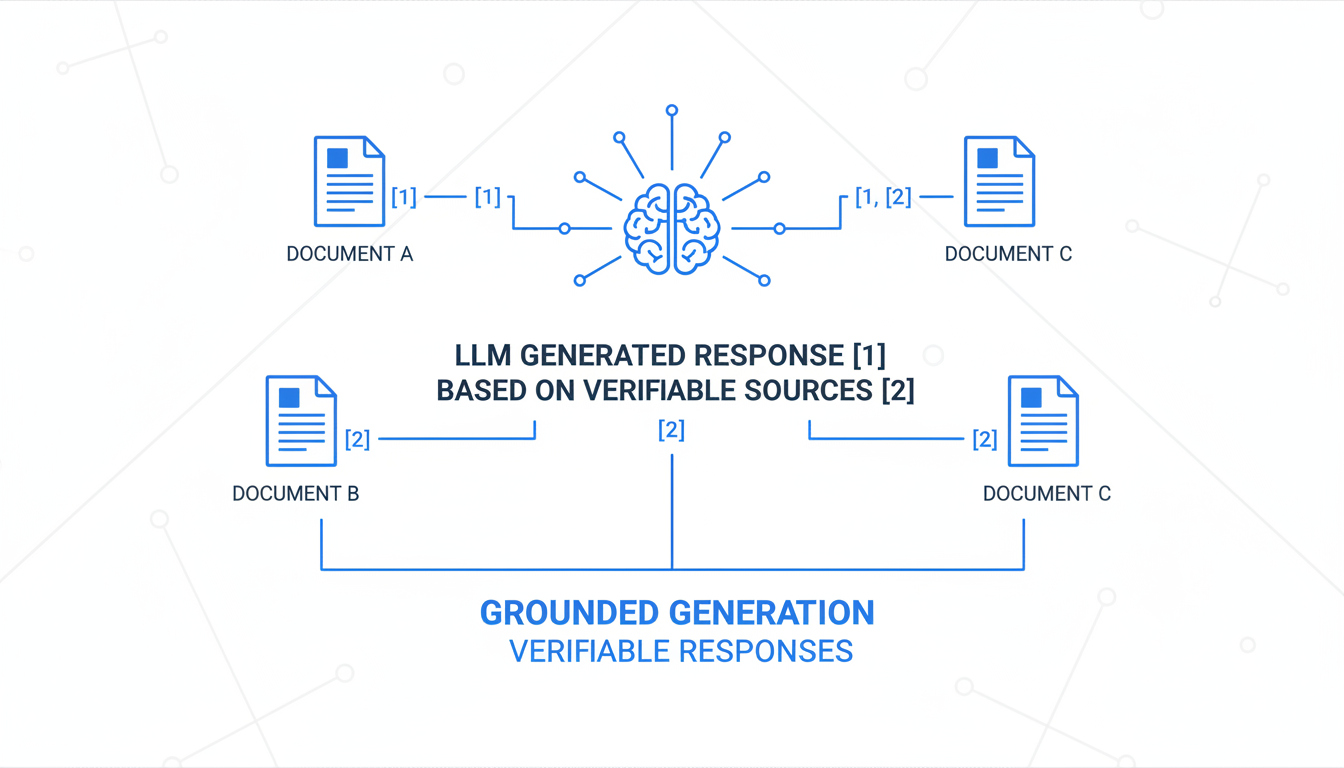 LLM generating grounded responses with retrieved context and citations.
Direct Retrieval Tool Integration
retrieval_tool = Tool.from_retrieval(
    retrieval=rag.Retrieval(
        source=rag.VertexRagStore(
            rag_resources=[rag.RagResource(rag_corpus=corpus_name)],
            rag_retrieval_config=rag.RagRetrievalConfig(top_k=10)
        )
    )
)

model = GenerativeModel(
    model_name="gemini-2.0-flash-001",
    tools=[retrieval_tool]
)

response = model.generate_content("Your question")
print(response.text)  # Grounded answer with citations
Supported Models
- Gemini 2.5 Pro, Flash, Flash-Lite
- Gemini 3.1 Pro, Flash-Lite (preview)
- Gemini 3 Flash, 3 Pro (preview)
- Self-deployed models from Model Garden
- Managed APIs: Mistral on Vertex AI, Llama 3.1/3.2
Important: Fine-tuned Gemini models are not supported with RAG Engine.
Limitation: At most one corpus per generation request.
Vertex AI Search as Retrieval Backend
You can also use Vertex AI Search as the retrieval backend instead of a vector database. This is useful if you already have search applications built on Vertex AI Search.
vertex_ai_search_config = rag.VertexAiSearchConfig(
    serving_config=f"{vertex_ai_search_engine_name}/servingConfigs/default_search"
)

corpus = rag.create_corpus(
    display_name="search_backed_corpus",
    vertex_ai_search_config=vertex_ai_search_config
)
Quick Start: Complete Working Example
import vertexai
from vertexai import rag
from vertexai.generative_models import GenerativeModel, Tool

PROJECT_ID = "your-project-id"
LOCATION = "us-central1"

# Initialize
vertexai.init(project=PROJECT_ID, location=LOCATION)

# Create corpus with defaults
rag_corpus = rag.create_corpus(
    display_name="my_corpus",
    backend_config=rag.RagVectorDbConfig(
        rag_embedding_model_config=rag.RagEmbeddingModelConfig(
            vertex_prediction_endpoint=rag.VertexPredictionEndpoint(
                publisher_model="publishers/google/models/text-embedding-005"
            )
        )
    )
)

# Import files
rag.import_files(
    rag_corpus.name,
    ["gs://my-bucket/documents/"],
    transformation_config=rag.TransformationConfig(
        chunking_config=rag.ChunkingConfig(chunk_size=512, chunk_overlap=100)
    )
)

# Create retrieval tool
rag_retrieval_tool = Tool.from_retrieval(
    retrieval=rag.Retrieval(
        source=rag.VertexRagStore(
            rag_resources=[rag.RagResource(rag_corpus=rag_corpus.name)]
        )
    )
)

# Generate
model = GenerativeModel("gemini-2.0-flash-001", tools=[rag_retrieval_tool])
response = model.generate_content("What are the key points?")
print(response.text)
Enterprise Production Setup
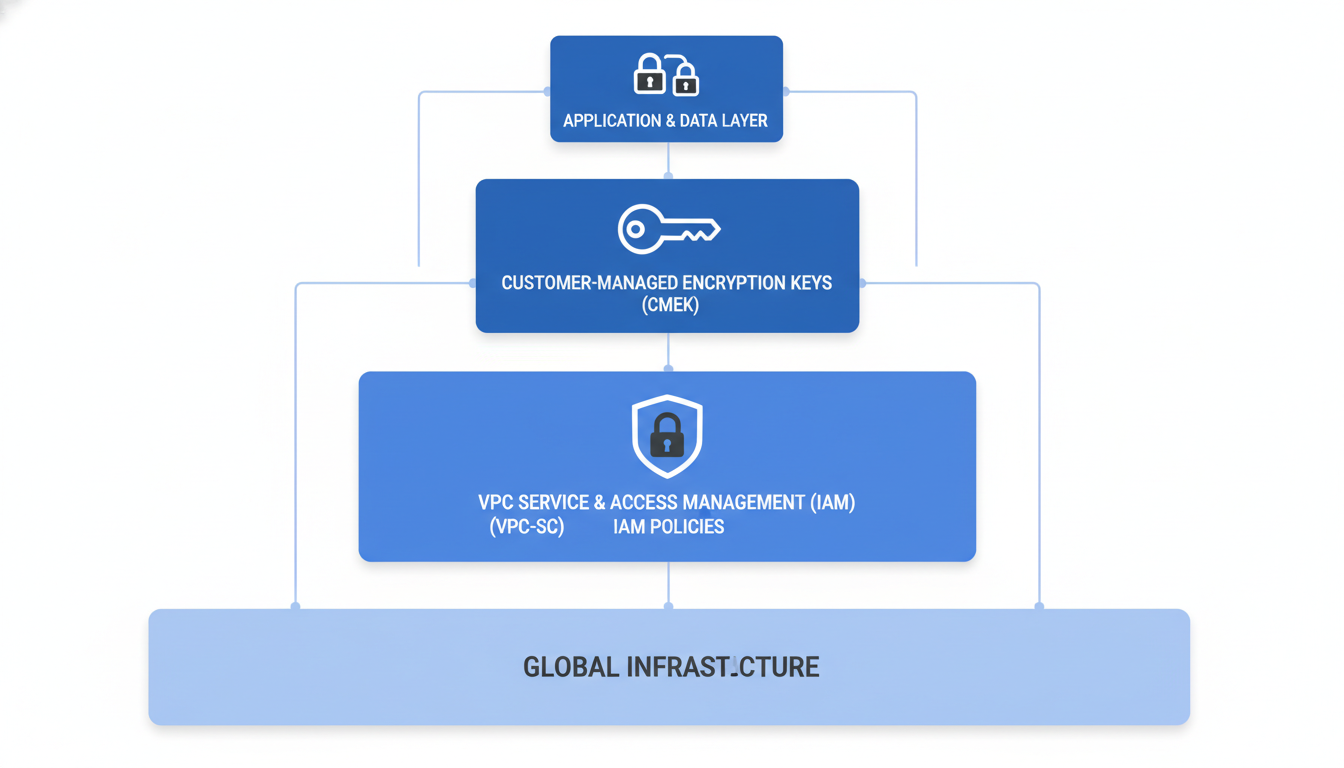 Security controls including CMEK, VPC-SC, and IAM permissions.
Security: CMEK Implementation
Requirements:
- Cloud KMS API enabled
- Key ring in same region as RAG Engine endpoint
- Purpose: Symmetric encrypt/decrypt
- Grant RAG service account
roles/cloudkms.cryptoKeyEncrypterDecrypter
from google.cloud.aiplatform_v1.types.encryption_spec import EncryptionSpec

corpus = rag.create_corpus(
    display_name="secure_corpus",
    encryption_spec=EncryptionSpec(
        kms_key_name="projects/<PROJECT>/locations/us-central1/keyRings/kr/cryptoKeys/key"
    )
)
Limitations:
- CMEK is immutable after corpus creation
- Maximum 50 unique KMS keys per project per region
- Only supported on RagManagedDb
VPC-SC Security Controls
Supported. When you enable a perimeter, add the service account to the “Include Google-provided role grants” list.
Data Residency and AXT Security
Not supported.
Production Pattern with CMEK and Scaled Tier
# Create corpus with CMEK
rag_corpus = rag.create_corpus(
    display_name="enterprise_corpus",
    encryption_spec=EncryptionSpec(kms_key_name=KMS_KEY_NAME)
)

# Import with LLM parser for quality
rag.import_files(
    rag_corpus.name,
    ["gs://enterprise-bucket/documents/"],
    transformation_config=rag.TransformationConfig(
        rag.ChunkingConfig(chunk_size=1024, chunk_overlap=256)
    ),
    llm_parser=rag.LlmParserConfig(
        model_name=f"projects/{PROJECT_ID}/locations/us-central1/publishers/google/models/gemini-2.5-flash"
    )
)
Advanced Features
Gemini Live API Integration
Build real-time voice or multimodal assistants with RAG grounding:
TOOLS = {
  "retrieval": {
    "vertex_rag_store": {
      "rag_resources": {
        "rag_corpus": f"projects/{PROJECT_ID}/locations/{LOCATION}/ragCorpora/{RAG_CORPUS_ID}"
      }
    }
  }
}

async with client.aio.live.connect(
  model="gemini-2.0-flash-exp",
  config=LiveConnectConfig(
    response_modalities=[Modality.TEXT],
    tools=TOOLS
  )
) as session:
  await session.send_client_content(
    turns=Content(role="user", parts=[Part(text="Your question")])
  )
  async for message in session.receive():
    if message.text:
      print(message.text)
Memory Corpus for Persistent Context
Store and index conversation context across Live API sessions. This enables sharing contexts across different sessions and retrieving past contexts related to your conversation.
memory_corpus = rag.create_corpus(
   display_name="conversation_memory",
   corpus_type_config=rag.RagCorpusTypeConfig(
       corpus_type_config=rag.MemoryCorpus(
           llm_parser=rag.LlmParserConfig(
               model_name="projects/<PROJECT>/locations/<LOC>/publishers/google/models/gemini-2.5-pro"
           )
       )
   ),
   backend_config=rag.RagVectorDbConfig(
       rag_embedding_model_config=rag.RagEmbeddingModelConfig(
           vertex_prediction_endpoint=rag.VertexPredictionEndpoint(
               publisher_model="publishers/google/models/text-embedding-005"
           )
       )
   )
)
Memory corpora support storing and indexing text and audio speech from session contexts.
Performance and Scaling
Quotas
| Resource | Limit | Metric |
|---|---|---|
| Data management APIs | 60 RPM | VertexRagDataService requests per minute per region |
| RetrievalContexts API | 600 RPM | VertexRagService retrieve requests per minute per region |
| Embedding token quota | 5M tokens/min | Per region |
| Concurrent ImportRagFiles | 3 | Per region |
| Max files per import | 10,000 | Per request |
Supported Regions
| Region | Location | Status |
|---|---|---|
| us-central1 | Iowa | Allowlist, GA |
| us-east4 | Virginia | Allowlist, GA |
| us-east1 | Moncks Corner, SC | Allowlist, Preview |
| europe-west3 | Frankfurt | GA |
| europe-west4 | Eemshaven | GA |
| asia-east1 | Taiwan | Preview |
| asia-northeast1 | Tokyo | Preview |
| asia-northeast3 | Seoul | Preview |
| asia-south1 | Mumbai | Preview |
| asia-southeast1 | Singapore | Preview |
| europe-central2 | Warsaw | Preview |
| europe-north1 | Finland | Preview |
| europe-southwest1 | Madrid | Preview |
| europe-west1 | Belgium | Preview |
| europe-west2 | London | Preview |
| europe-west6 | Zurich | Preview |
| europe-west8 | Milan | Preview |
| europe-west9 | Paris | Preview |
| us-east5 | Columbus, OH | Preview |
| us-south1 | Dallas, TX | Preview |
| us-west1 | Oregon | Preview |
| us-west4 | Las Vegas, NV | Preview |
Important: For us-central1, us-east1, and us-east4, new projects must be allowlisted. Contact [email protected].
Common Pitfalls
| Pitfall | Symptom | Fix |
|---|---|---|
| Drive permissions | Import silently fails | Grant service account Viewer on Drive folder |
| Embedding model deprecation | Corpus becomes unusable | Use fine-tuned or self-deployed models |
| ANN not rebuilt | Retrieval quality degrades | Set rebuild_ann_index: true after imports |
| Vector DB region mismatch | High latency | Deploy DB in same region as RAG Engine |
| CMEK key region mismatch | Corpus creation fails | Create key ring in same region |
| Exceeding import concurrency | Requests queued indefinitely | Max 3 concurrent imports per region |
| File size on Layout Parser | Import fails | Max 20 MB, 500 pages/PDF |
| Non-numeric Vector Search IDs | 400 error | Use numeric IDs, not display names |
| Wrong secret version | 404 error | Use versions/latest, not versions/1 |
| Multiple ranking layers | 400 error | Only one ranking config allowed |
| Lowercase Weaviate collection | Collection not found | Capitalize first letter |
Cost Management
Billing Breakdown
| Component | Pricing Model | Typical Monthly Cost (PoC) |
|---|---|---|
| RagManagedDb Basic (100 PU) | Spanner pricing | Around $200-250 |
| Embedding (text-embedding-005) | $0.075/M input tokens | 1M tokens costs about $0.075 |
| LLM Parser (Gemini 2.5 Flash) | Per-token pricing | 5M tokens costs about $3.75 |
| Vertex Ranking API | Per-request pricing | 10k requests costs about $1 |
| Gemini Generation (2.0 Flash) | Per-token pricing | 3M output tokens costs about $7.5 |
Cost Optimization Tips
- Use Unprovisioned tier for development (eliminates Spanner bill)
- Default parser is free. Only use LLM or Layout parser when needed
- Smaller chunks reduce embedding costs but increase retrieval calls
- Batch imports to stay within quotas and avoid retries
Clean-Up Procedure
Important: This permanently deletes all data and stops billing.
curl -X PATCH \
-H "Authorization: Bearer $(gcloud auth print-access-token)" \
-H "Content-Type: application/json" \
"https://LOCATION-aiplatform.googleapis.com/v1/projects/PROJECT_ID/locations/LOCATION/ragEngineConfig?update_mask=rag_tier" \
-d '{"rag_tier": "UNPROVISIONED"}'
Warning: Data cannot be recovered after deletion.
Best Practices Checklist
| Do This | Don’t Do This |
|---|---|
| Enable Secret Manager and grant Secret Accessor to RAG service account | Store API keys in plain environment variables |
Use latest secret version in all references | Reference specific versions like versions/1 |
Call rebuild_ann_index=true at least once for ANN backends | Expect immediate ANN updates after import |
Set tree_depth and leaf_count for ANN with over 10K files | Omit them and suffer degraded recall |
| Use numeric IDs for Vector Search index and endpoint | Pass display names |
| Verify model supports grounding before adding retrieval tool | Use models without grounding capability |
Keep vector_distance_threshold above 0 | Set to 0 expecting all results |
| Remember one-corpus-per-generation-tool restriction | Pass multiple corpora in single tool |
| Capitalize Weaviate collection names | Use lowercase |
Key Takeaways
The Vertex AI RAG Engine industrializes a pattern that used to require stitching together multiple services. It works. It scales. It has production-grade guarantees.
What actually matters:
-
Vector database choice determines cost structure, scalability, and feature availability. Start with RagManagedDb Basic, move to Scaled when you hit limits.
-
Parser choice determines quality. Default is free but limited. LLM parser costs money but understands complex documents.
-
Embedding models are sticky. Choose wisely based on language requirements and deprecation risk.
-
Reranking is the hidden quality booster. Use it for any user-facing application.
-
Service account permissions are the number one source of silent failures.
-
Quotas are tighter than you think. Plan for 3 concurrent imports, 60 RPM management operations, 600 RPM retrieval.
-
Region selection has consequences. Some features require allowlisting.
Sources and Further Reading
- Vertex AI RAG Engine Overview
- RAG Quickstart
- Vector Database Choices
- Use RagManagedDb with RAG
- Use Vertex AI Vector Search
- Use Weaviate Database
- Use Pinecone
- Use Vertex AI Feature Store
- Data Ingestion
- Use Embedding Models
- LLM Parser
- Document AI Layout Parser
- Reranking for RAG
- Use RAG in Multimodal Live API
- Use Vertex AI Search as Retrieval Backend
- Use Vector Search 2.0 with RAG
- CMEK Support
- RAG Engine Billing
- Understanding RagManagedDb
- Manage Your RAG Corpus
- Supported Documents
- Supported Models
- RAG Engine Quotas
- Fine-tune RAG Transformations
Questions? Contact [email protected]
This is the technical foundation. The rest is execution. Go build something that works.